

/image%2F0881799%2F20150718%2Fob_bae49d_980x285-ct.jpg)
Active Setup
Active Setup is similar to RunOnce, it allows you to launch a command at logon. This command will be launched once and only once for users (existing or new) when logging in.
The registry keys to set up to use ActiveSetup can be found in:
- HKEY_LOCAL_MACHINE\Software\Microsoft\Active Setup\Installed Components\<UID>
When running ActiveSetup at logon, a registry key will be placed in
- HKEY_CURRENT_USER\Software\Microsoft\Active Setup\Installed Components\<UID>
Operation of Active Setup
When a user logs in, the system checks all Active Setup registry keys in HKEY_LOCAL_MACHINE and see if it already exists in HKEY_CURRENT_USER\Software\Microsoft\Active Setup\Installed Components\
If it already exists then the key is not executed, however, if it does not exist then key is executed and then copied to HKEY_CURRENT_USER\Software\Microsoft\Active Setup\Installed Components\ to no longer be launched the next time you log on.
Creation of an Active Setup
The active Setup will allow you to run a command, a script, an MSI, etc. at the start of the user session.
For this, it is necessary to create a key with a unique ID in HKEY_LOCAL_MACHINE\SOFTWARE\Microsoft\Active Setup\Installed Components\
In this case, we used the GUID of machine to make sure there is no duplicate with another Active Setup.
Then create at least the key "StubPath" which will define what you want to launch (Script, MSI, ect…)
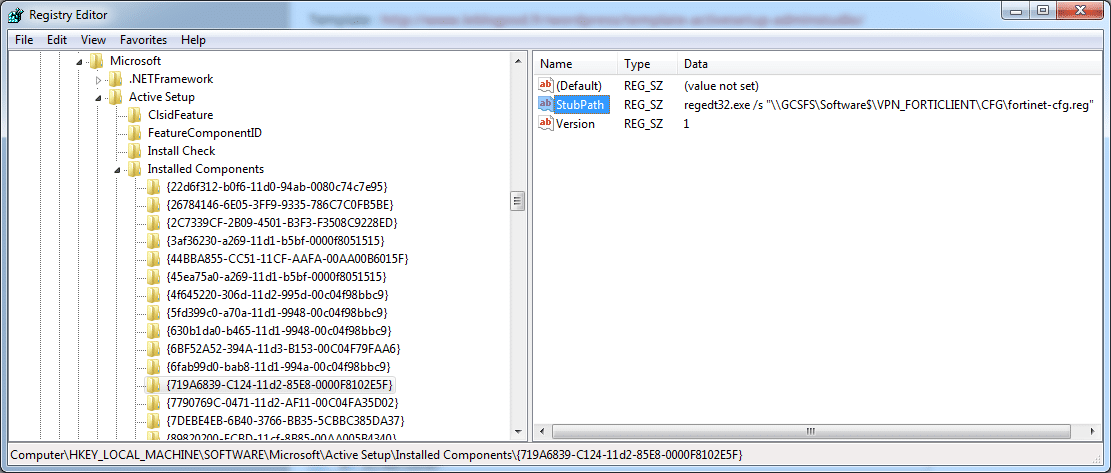
The data to put in the key StubPath is the command you want to run. This could be running an msi for example, or even, as in my case, running a Regedit file. So all users will have a registry key copied to « HKEY_CURRENT_USER ».
/image%2F0881799%2F20140610%2Fob_a8c7fe_logo2.jpg)
Commenter cet article