

/image%2F0881799%2F20150718%2Fob_bae49d_980x285-ct.jpg)
[SCCM 2016] SCCM 2016 prerequisites
For SCCM 2016 we have prerequisites: hardware, software, service accounts and AD Schema
- Hardware
- CPU 2 x v-CPU
- Memory 16 GB (in my lab 6 GB)
- 7 x HDD
- C:\ OS, 80 GB, OS Installation
- D:\ APPS, 80 GB, SCCM binaries
- E:\ Content, 200 GB, Source files for apps, drivers, updates, packages, etc
- F:\ Temp DB, 20 GB
- G:\ Temp DB logs, 20 GB
- H:\ DB, 40 GB
- I:\ DB logs, 20 GB
- Software
- SQL server (it's free for System center usage) with collation SQL_Latin_General_CP1_CI_AS
- Windows ADK for Windows 10, version 1607 Link: https://developer.microsoft.com/en-us/windows/hardware/windows-assessment-deployment-kit
- Windows Roles
- BITS
- .Net
- WSUS, After you finished to install SQL
- IIS
- Common HTTP Features
Static Content
Default Document
Directory Browsing
HTTP Errors
HTTP Redirection - Health and Diagnostics
HTTP logging
Logging tools
Request Monitor
Tracing - Performance
Static Content Compression
Dynamic Content Compression -
SecurityBasic Authentication
Windows Authentication
URL Authorization
Request Filtering
IP and Domain Restrictions -
Application Development
ASP.NET 4.5
.NET Extensibility
ASP 4.5
ISAPI Extensions
ISAPI Filters -
Management ServiceIIS 6 Management Compatibilty
IIS 6 Metabase Compatibility
IIS 6 WMI Compatibility
IIS 6 Scripting Tools
IIS 6 Management ConsoleAll Management Tools
IIS Management Console
IIS Management Scripts and Tools
- Service accounts
- Domain Group sccm_admin where you will drop all domain members to be administrators in SCCM
- SQL account db_sccm
- SCCM push client sccm_push, regular domain user
- AD
- System Management Container
- Schema Update
- GPO to add sccm_push to the local administrator
- GPO to stop windows automatic update
- GPO to add firewall exception in windows firewall for push sccm agent
System Management Container
Open adsiedit.msc and connect to Default Naming Context
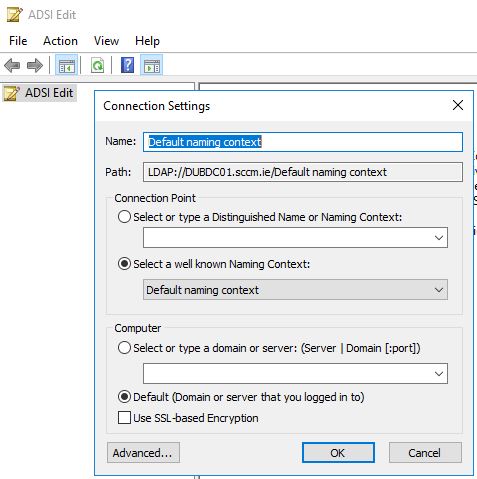
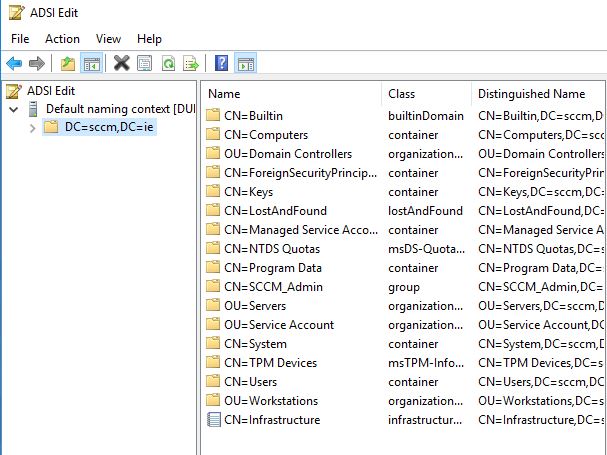
Select CN=System right click and create a new object
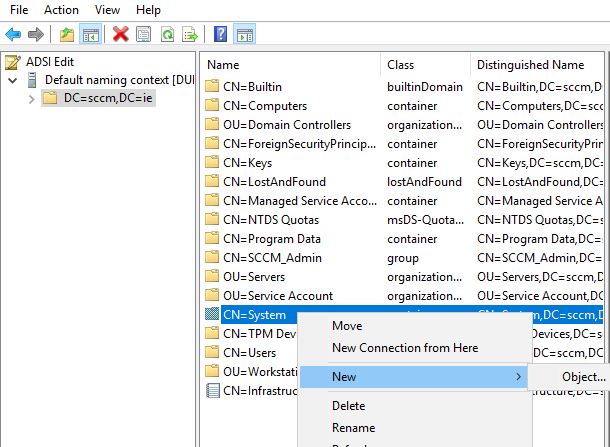
Select Container --> Next --> Value add System Management --> Next --> Finish
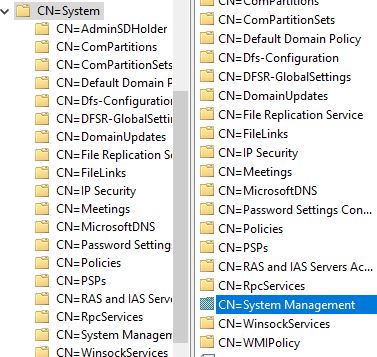
Now open Active Directory Users and Computers, select view-->Advanced Features
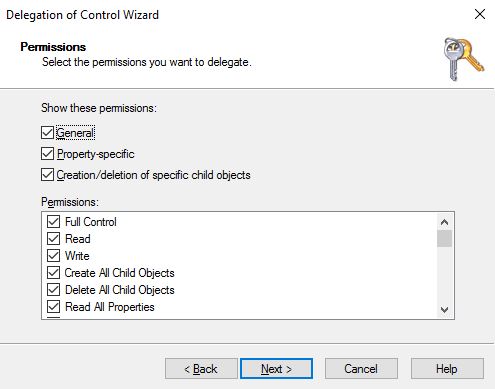
Right click on the new container, System Management, and select Delegate control --> Next --> Select the SCCM server object --> Create a custom task to delegate --> Select default This folder, existing objects ... --> Next --> Select everything (General, Property-Specific, Creation/Deletion ..) with Permissions: Full control --> Finish
Schema Update
This step can be made from any station with domain admin wrights, I will run that from my sccm server. Open command prompt Go to SCCM installation package
<source sccm>:\SC_Configmgr_SCEP_1606\SMSSETUP\BIN\X64>extadsch.exe
/image%2F0881799%2F20140610%2Fob_a8c7fe_logo2.jpg)
Commenter cet article