

/image%2F0881799%2F20150718%2Fob_bae49d_980x285-ct.jpg)
[SCCM] How to enable new Software Center in SCCM 1511
In order to enable the new Software Center, launch the configuration manager console, click on Administration > Overview > Client Settings. Right click the client settings (default or custom), click Properties. In the Computer Agent settings, you will find a new setting called “Use new Software Center”. By default the setting is set to No. Set it to YES to enable new software center.
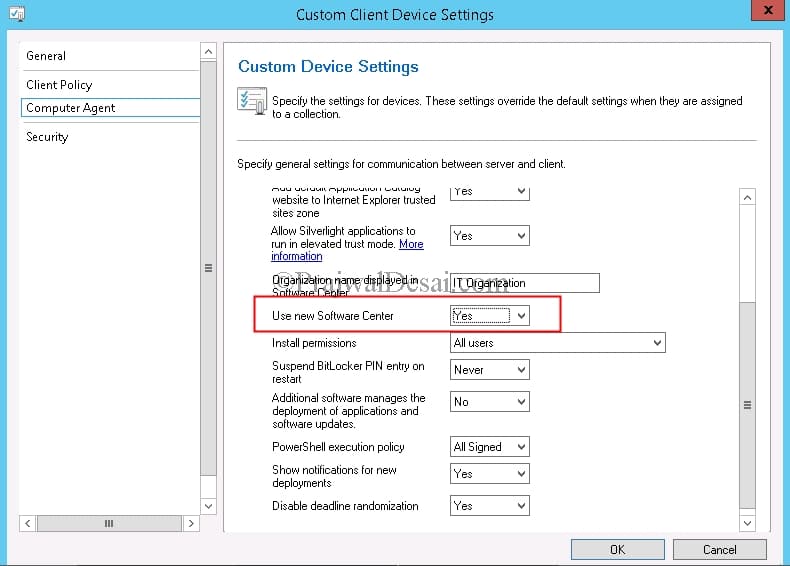
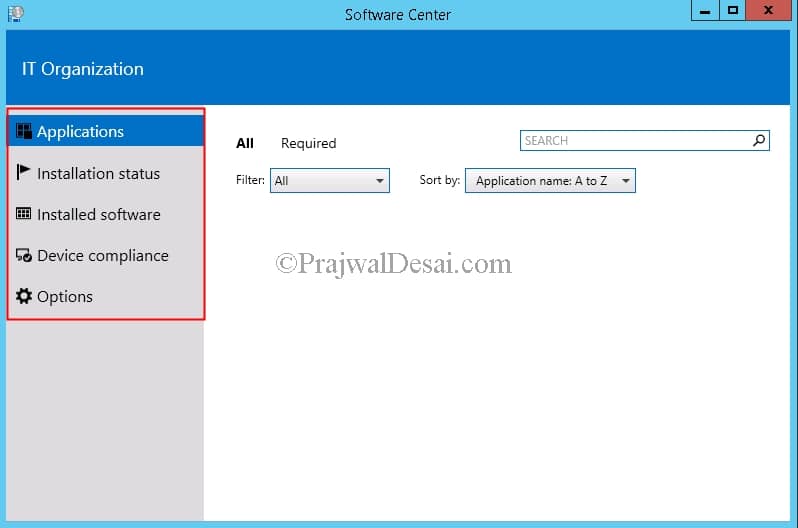
Once your client computers have downloaded the new policy, the new software center will be available on the computers. If you don’t see it, then initiate a Machine Policy Retrieval & Evaluation Cycle on your client. You can see the new software center is quiet different from the old one. It has got many other options and a new option called Device Compliance, this is not for Compliance Settings (DCM) it’s for Conditional Access scenarios. Another change is installation directory, when you enable the new software center in SCCM 1511, the installation directory of software center is located at C:> Windows > CCM > ClientUX.
/image%2F0881799%2F20140610%2Fob_a8c7fe_logo2.jpg)
Commenter cet article